
How to Download Aadhaar Card Online Easily (Step-by-Step Guide)
In today’s digital world, carrying physical documents everywhere is no longer necessary. The Government of India has made it extremely convenient for citizens to access important documents online, and Aadhaar is one of them. Whether you’ve misplaced your Aadhaar card, need a digital copy urgently, or simply want to keep a soft copy for safety, downloading your Aadhaar card online is quick and easy.
This guide will walk you through everything you need to know about downloading your Aadhaar card online, including different methods, requirements, and helpful tips.
What is Aadhaar Card?
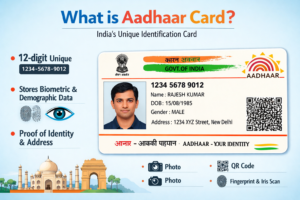
Aadhaar is a 12-digit unique identification number issued by the Unique Identification Authority of India (UIDAI). It serves as proof of identity and address and is widely used for government services, banking, subsidies, mobile SIM verification, and more.
The Aadhaar card is available in both physical and digital formats. The digital version, known as e-Aadhaar, is equally valid and accepted everywhere.
What is e-Aadhaar?
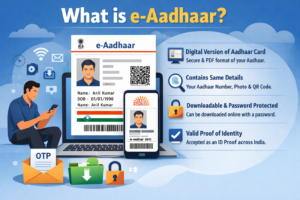
e-Aadhaar is the electronic version of your Aadhaar card. It is a password-protected PDF file that you can download from the official UIDAI website.
It contains:
- Your Aadhaar number
- Photograph
- Name, gender, and date of birth
- Address
- QR code for verification
According to UIDAI, e-Aadhaar is legally valid just like the physical Aadhaar card.
Requirements to Download Aadhaar Card Online
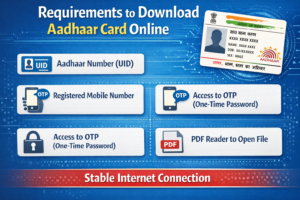
Before you begin, make sure you have the following:
- Aadhaar Number (UID), Enrolment ID (EID), or Virtual ID (VID)
- Registered mobile number (for OTP verification)
- Internet connection
- Smartphone or computer
Without a registered mobile number, downloading Aadhaar online becomes difficult because OTP verification is mandatory.
Method 1: Download Aadhaar Card Using Aadhaar Number
This is the most common and easiest method.
Step-by-Step Process:
- Visit the official UIDAI website
Go to: https://uidai.gov.in - Click on “Download Aadhaar”
You will find this option under “My Aadhaar” section. - Select “Aadhaar Number (UID)”
Enter your 12-digit Aadhaar number. - Enter Captcha Code
Fill in the security captcha shown on the screen. - Click on “Send OTP”
An OTP will be sent to your registered mobile number. - Enter OTP
Type the OTP received on your phone. - Click on “Verify & Download”
Your Aadhaar PDF will be downloaded instantly.
Method 2: Download Aadhaar Using Enrolment ID (EID)
If you have not yet received your Aadhaar number, you can use your enrolment slip.
Steps:
- Go to UIDAI website
- Click on “Download Aadhaar”
- Select “Enrolment ID (EID)”
- Enter:
- 14-digit enrolment number
- Date and time (as mentioned in slip)
- Enter captcha
- Click “Send OTP”
- Enter OTP and download
Method 3: Download Aadhaar Using Virtual ID (VID)
Virtual ID is a temporary 16-digit number that can be used instead of Aadhaar for privacy.
Steps:
- Visit UIDAI website
- Select “Virtual ID (VID)”
- Enter your 16-digit VID
- Enter captcha
- Click “Send OTP”
- Enter OTP
- Download your Aadhaar
How to Open e-Aadhaar PDF (Password)
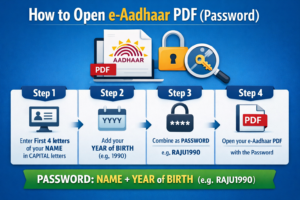
The downloaded Aadhaar file is password protected.
Password Format:
- First 4 letters of your name (in CAPITAL letters)
- Year of birth (YYYY)
Example:
- Name: Rahul Kumar
- Year of Birth: 1995
- Password: RAHU1995
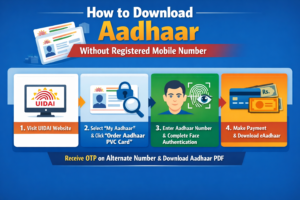
How to Download Aadhaar Without Registered Mobile Number
If your mobile number is not linked with Aadhaar, you cannot download it online directly.
Alternative options:
- Visit nearest Aadhaar Seva Kendra
- Provide biometric verification
- Request a printout (may cost a small fee)
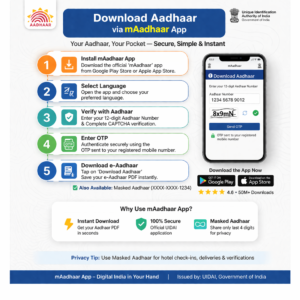
Download Aadhaar via mAadhaar App
UIDAI also provides a mobile application for easy access.
Steps:
- Download “mAadhaar” app from Play Store/App Store
- Open the app
- Register your mobile number
- Add your Aadhaar profile
- Download or view Aadhaar anytime
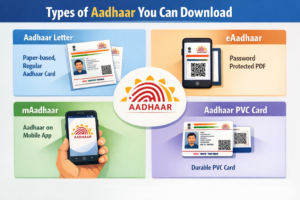
Types of Aadhaar You Can Download
When downloading Aadhaar, you may come across different formats:
1. Regular Aadhaar
Standard full Aadhaar card with complete details.
2. Masked Aadhaar
Shows only last 4 digits of Aadhaar number for privacy.
3. e-Aadhaar
Digital PDF version.
4. PVC Aadhaar Card
A plastic card version you can order online.
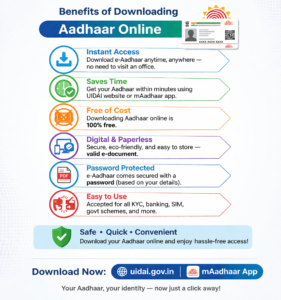
Benefits of Downloading Aadhaar Online
Downloading Aadhaar online offers several advantages:
- Instant access anytime, anywhere
- No need to carry physical card
- Secure and password protected
- Accepted everywhere
- Saves time and effort
- Easy re-download if lost
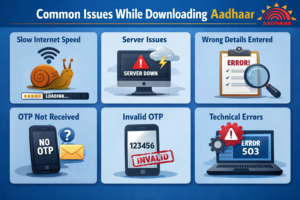
Common Issues While Downloading Aadhaar
Sometimes users face problems while downloading Aadhaar. Here are common issues and solutions:
1. OTP Not Received
- Check network signal
- Ensure mobile number is registered
- Try again after some time
2. Wrong Details Entered
- Double-check Aadhaar number or EID
- Verify captcha correctly
3. Unable to Open PDF
- Ensure correct password format
- Use updated PDF reader
4. Mobile Number Not Linked
- Visit Aadhaar centre to update mobile number
Tips for Safe Use of Aadhaar
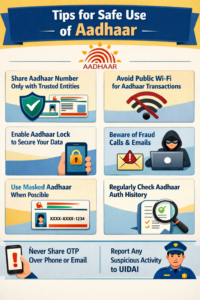
- Never share your Aadhaar number publicly
- Use masked Aadhaar when possible
- Download only from official UIDAI website
- Keep your Aadhaar details secure
- Avoid third-party websites
Is e-Aadhaar Valid Everywhere?
Yes, e-Aadhaar is fully valid under the Aadhaar Act. It can be used for:
- Bank account opening
- Government schemes
- Identity verification
- Address proof
- SIM card verification
Authorities accept it as a valid proof just like the physical card.
Frequently Asked Questions (FAQs)
1. Is it free to download Aadhaar online?
Yes, downloading e-Aadhaar is completely free.
2. Can I download Aadhaar without OTP?
No, OTP verification is mandatory for security reasons.
3. How many times can I download Aadhaar?
You can download it unlimited times.
4. What if I forget Aadhaar number?
You can retrieve it using your registered mobile number from UIDAI website.
5. Can I print e-Aadhaar?
Yes, you can print it and use it as a valid document.
Conclusion
Downloading your Aadhaar card online is a simple and hassle-free process that can be completed within minutes. Whether you use your Aadhaar number, enrolment ID, or virtual ID, the UIDAI platform ensures a secure and user-friendly experience.
With digital services becoming more common, having access to your e-Aadhaar is essential. It not only saves time but also ensures that you always have your identity proof available whenever needed.
If you haven’t downloaded your Aadhaar yet, now is the perfect time to do it and keep a secure copy for future use.